
Layers
Last update: 23 August, 2021
| Description | Extends |
|---|---|
| Connects the framework to custom information. | YouBIMIntegrationFramework.Layer |
Description
Layers provides an interface to place DOM Elements on top of the Viewers. Creates a new layer on top of the Framework which can be enabled and disabled independently.
Available methods
| Method name | Returns |
|---|---|
| static getProperties() | json |
| initialize() | void |
| initializeFilters() | json |
| async enable(context) | [ ] any |
| disable() | void |
| async applyFilters(context, data) | void |
| showIcons() | [ ] any |
static getProperties();
Called at YIF initialization.
Icon to show in the layers list. Icons are retrieved from the Font Awesome icons package.
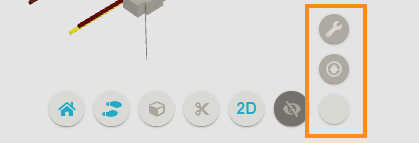
| Property | Description |
|---|---|
| name | Layer name to identify in the |
| prefix | fa | fas |
| iconName | Icon name without its prefix |
| events | Only the onClick event is enabled. The event is called when the user clicks on the icon above the viewer. |
See the available icons here.
static getProperties() {
    return {
      name: 'Work Orders',
      icon: {
        iconName: 'wrench',
        prefix: 'fa',
      },
      events: {
        onClick: (event, element) => onClickIcon(event, element),
      },
    };
  }
initialize();
Called only once in the layer life-cycle right after the layer has been created and attached to the Viewers. The implementation overrides the base initialize() method. This method can be used to place logic such as creating initial data state or setting up custom objects.
async enable(context) [] any;
Called each time the user enables (clicks) the layer. This method can be used to place logic such as fetching data from an external API.
Note: Very important id property for see the sensor elements in the Viewers.
  //Contract
  [
    count: 1,
    workorder: [
      {
        id: 123456,
        title: "Test Dev",
        description: "WO new test",
        type: "Preventive",
        status: "New",
      },
    ],
    priority: "Low",
    asset_name: "Door 1",
    id: "1a4bc799-7a6c-4bb2-aa6e-63ae3146e20a-0003209d",
  ]

  async enable(context) {
    const self = context;

    // In a real implementation these will be retrieved from an API for instance.
    const data = {
        guid: "54e6306f-cd02-4dbc-b747-5b497b5cc9fc",
        counter: 3
    }

    LayerTest.showIcons(context, data);

    return data;
}
showIcons(context, data);
Displays the DOM elements in the Viewers.
 showIcons(context, data) {
    const self = context;

    const domel = document.createElement('div');
    domel.classList.add('wo-icon-3d');
    domel.innerHTML = `
        <img src="/wo-new.svg" />
            <div style="" class="icon-count">${data.counter}</div>
        `;
    self.addIcon(domel, data.guid);
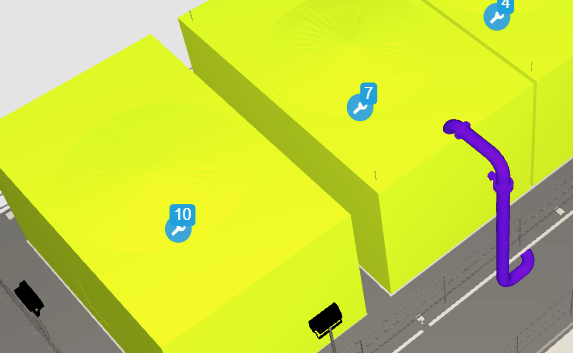
}
disable();
Hides the DOM elements from the Viewers.
Called each time the user disables (clicks) the layer. This method can be used to place logic such as removing the DOM elements from the Viewers.
InitializeFilters():json;
Called when the layer is activated, before executing the enabled method.
This method is optional, it is used to configure the filters that can be applied to the layer and can displays the DOM elements filtered in the Viewers.
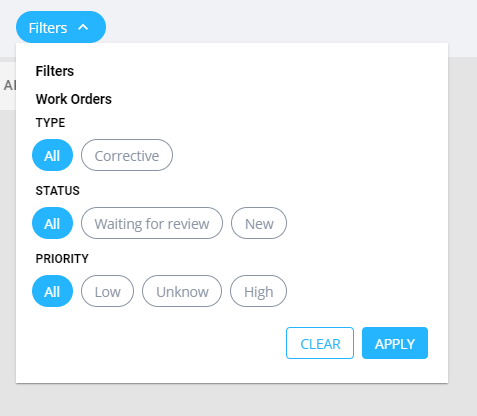
The filters are built dynamically, that is, according to the values returned in the query.
In order for the framework to be able to show the information, You need to respect the below format:
Example
initializeFilters() {
  let filters = [
  {
    name: 'Type', // Name show container filter component
    param: 'workordertype.name', // Name of the property by which the different values will be get
  },
  {
    name: 'Status',
    param: 'status.name',
  },
  {
    name: 'Priority',
    param: 'priority.name',
  },
];

  return filters;
}
async applyFilters(context, data)|[ ] string
Called every time the user clicks on the ‘Apply’ button.
The method receives the previously filtered data.
Note: The data object is the same type returned in the enable() method.
async applyFilters(context, data)
{
  //Here you can call the function that displays the icons in the viewers
  LayerTest.showIcons(context, data);
}
Example
class LayerTest extends YouBIMIntegrationFramework.Layer {
  static getProperties() {
    return {
      name: "Layer Name",
      icon: {
        iconName: "wrench",
        prefix: "fa",
      },
      events: {
        onClick: (event, data) => onClickIcon(event, data),
      },
    };
  }

  initialize() {}

  disable() {}

  async enable(context) {
    const self = context;
    const workOrders = magicMethodToGetWorkOrders();
    showIcons(context, workOrders);
    return workOrders;
  }

  initializeFilters() {
    let filters = [
      {
        name: "Type", // Name show container filter component
        param: "workordertype.name", // property find in the data
      },
      {
        name: "Status",
        param: "status.name",
      },
      {
        name: "Priority",
        param: "priority.name",
      },
    ];

    return filters;
  }

  async applyFilters(context, data) {
    //Here you can call the function that displays the icons in the viewers
    showIcons(context, data);
  }

  showIcons(context, workOrders) {
    for (let icon of self.icons) {
      self.removeIcon(icon);
    }

    let guids = [];

    workOrders.map((wo) => {
      if (wo.guid) {
        assetsGuid.push(wo.guid);
      }
    });

    self.icons = [];

    for (var wo of workOrders) {
      const domel = document.createElement("div");
      domel.classList.add("wo-icon-3d");
      domel.innerHTML = `
              <img src="./img/wo-new.svg" />
                  <div style="" class="icon-count">${wo.count}</div>
              `;
      self.icons.push(self.addIcon(domel, wo.guid));
    }

    return assetsGuid;
  }
}