
IoT
Last update: 23 August, 2021
| Description | Extends |
|---|---|
| Connects the framework to custom information. | YouBIMIntegrationFramework.BMS |
The IoT layer extends from the YouBIMIntegrationFramework.BMS that also extends YouBIMIntegrationFramework.Layer. Please include it in this table and add a note that all methods available in that layer are also available in the IoT layer as well.
Description
IoT provides an interface where you can show Asset List with Filter sensors in the Viewer.
Available methods
Note: See Layers for anothers methods definition.
| Method name | Returns |
|---|---|
| static getProperties() | json |
| async enable(context) | [ ] any |
| addElement(context, selectedData) | void |
static getProperties();
static getProperties() {
    return {
      name: 'BMS',
      icon: {
        iconName: 'thermometer-half',
        prefix: 'fa',
      },
      events: {
         onClick: (event, element) => onClickIcon(event, element),
      },
    };
  }
async enable() [] any;
Displays List Assets and Filters in the Viewers.
Called each time the user enables (clicks) the layer. This method can be used to place logic such as fetching data from an external API.
Note: Very important guid property for see the sensor in the Viewers.
// Contract
  [
   {
    "asset_name": "CT-012",
    "description": "Coiling Steel Door",
    "tag": "valve",
    "sensors": [
      {
        "id": 28,
        "name": "Temperature",
        "value": "24°",
        "icon": "thermometer-half"
      }
    ],
    "guid": "053803c5-f993-4d30-8991-413039119d88-0032a9b6",
    "id": "1"
    }
  ]


  async enable(context) {
    const self = context;

    // In a real implementation these will be retrieved from an API for instance.
    const response = await fetch(
        `https://example.com/api/v1/assets`, {
            method: 'GET',
        }
    );

    return (await response.json());
  }
addElement(context, selectedData) void;
Override this method to display additional information when you select any asset in the list.
The selectedData object is one of the items returned in the enable() method.
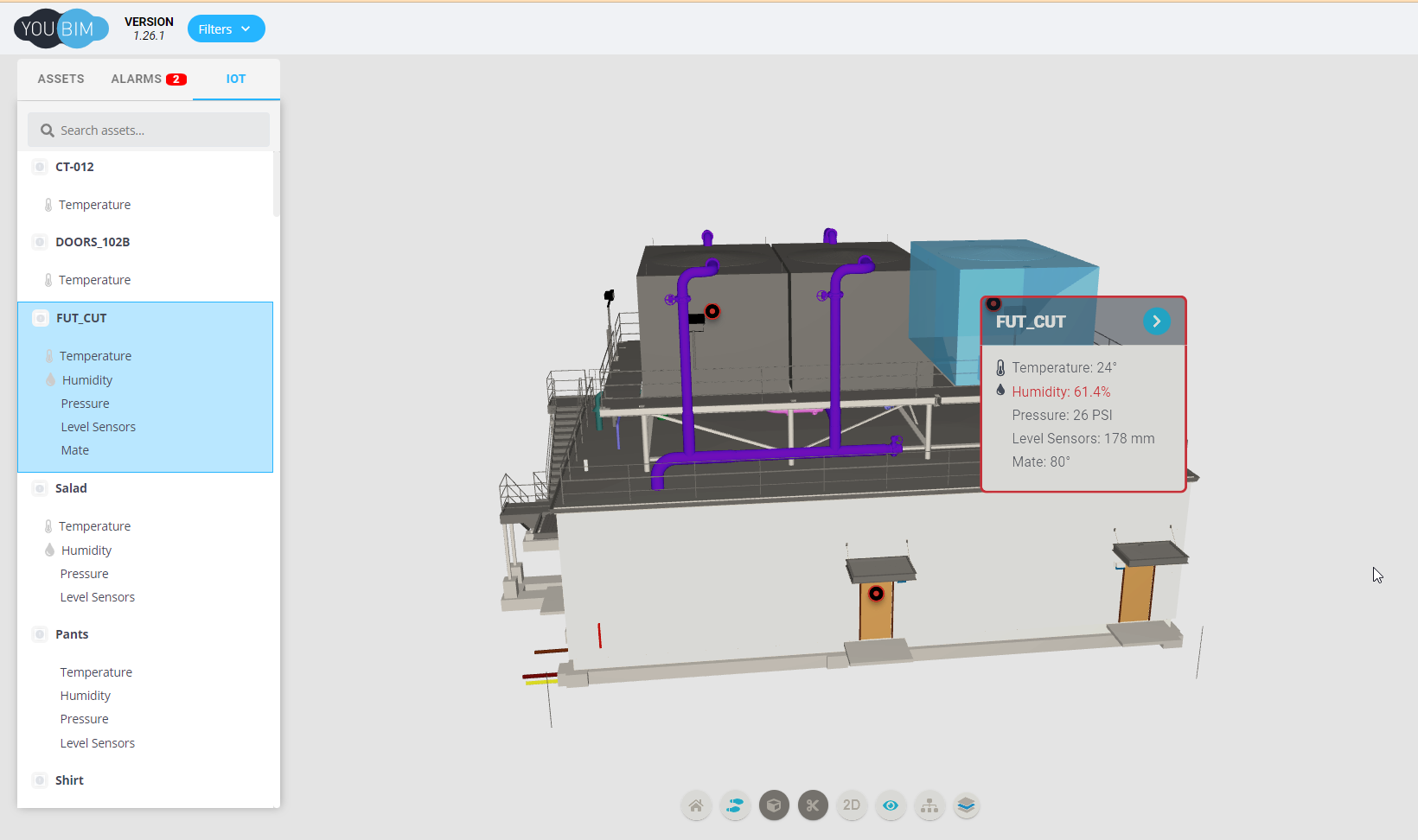
Note: Those sensors that have alarms are shown, highlighting them in red.
Example
class BMSTest extends YouBIMIntegrationFramework.BMS {
  static getProperties() {
    return {
      name: 'BMS',
      icon: {
        iconName: 'thermometer-half',
        prefix: 'fa',
      },
      events: {
        onClick: (event, element) => onClickIcon(event, element),
      },
    };
  }

  async enable(context) {
    const self = context;

    // In a real implementation these will be retrieved from an API for instance.
    const response = await fetch(`https://example.com/api/v1/assets`, {
      method: 'GET',
    });

    return await response.json();
  }
}