
Data Provider
Last update: 21 August, 2021
| Description | Extends |
|---|---|
| Connects the framework to asset information. | YouBIMIntegrationFramework.DataProvider |
Description
Connects the Integration Framework to any external source of data. The Integration Framework offers a default data provider that can extend to fill the methods definition with your custom behaviour.
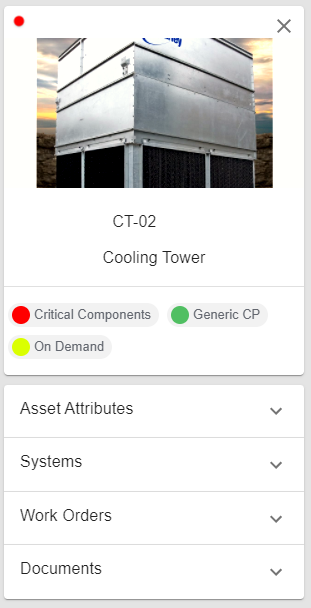
Every time an asset is selected in the model, the data requested by the provider will be displayed in the asset information panel.
Available methods
| Method name | Returns |
|---|---|
| * GetAssetDataByGUID(guid : string) | void |
| * GetAssetList(pageNumber: number) | [ ] IDataAsset |
| * GetAssetWithSensors(refresh?: boolean) | [ ] IAssetsSensors |
| * async GetSystemList(buildingId: number) | any |
| * GetSystemAssetsById(buildingId?: number, systemIds?: number) | [ ] number |
| * async GetAssetsByFloorId(floorId: number) | any |
| * async GetAssetsWithTags() | [ ] any |
| * async GetAssetsByTagId(selectedTags: number[]) | [ ] string |
* GetAssetDataByGUID(guid : string);
By overriding this method you can get asset information from any API you have access to.
In order for the framework to be able to show the information, you need to respect the below format:
title: 'Asset name',
description: 'Asset description',
link: `https://some.extarnal.site/${yourAsset.id}`,
image: 'asset.jpg',

// Blocks contain any extra information you may want to show when displaying asset information.
blocks: [
    {
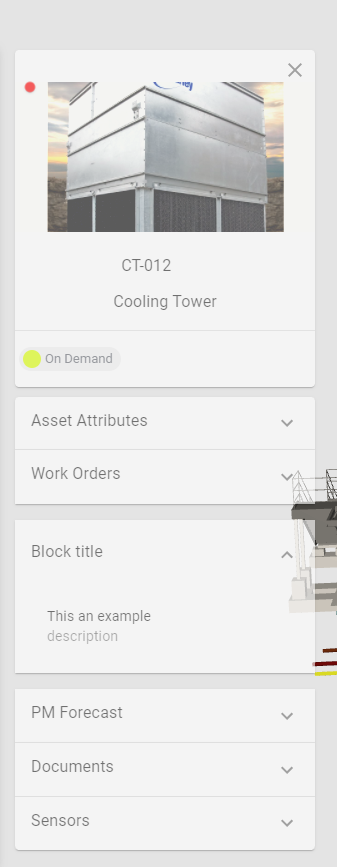
        title: 'Block title',
        body: {
          "description": "This is an example"
        }    // Either an object or an array
        onClick: (yourExtraInfoObject, actions) => {

            console.log(yourExtraInfoObject);

            window.open(
                `https://some.extarnal.site/more-info/${yourExtraInfoObject.id}`,
                '_blank'
            );

            anyCustomJavaScriptFunction();
        }
    }
]
The body property is a json, so, the component show the data as key and value.
Note: You can yield as many blocks as you want. See example below.
* GetAssetList(pageNumber: number) [] IDataAsset;
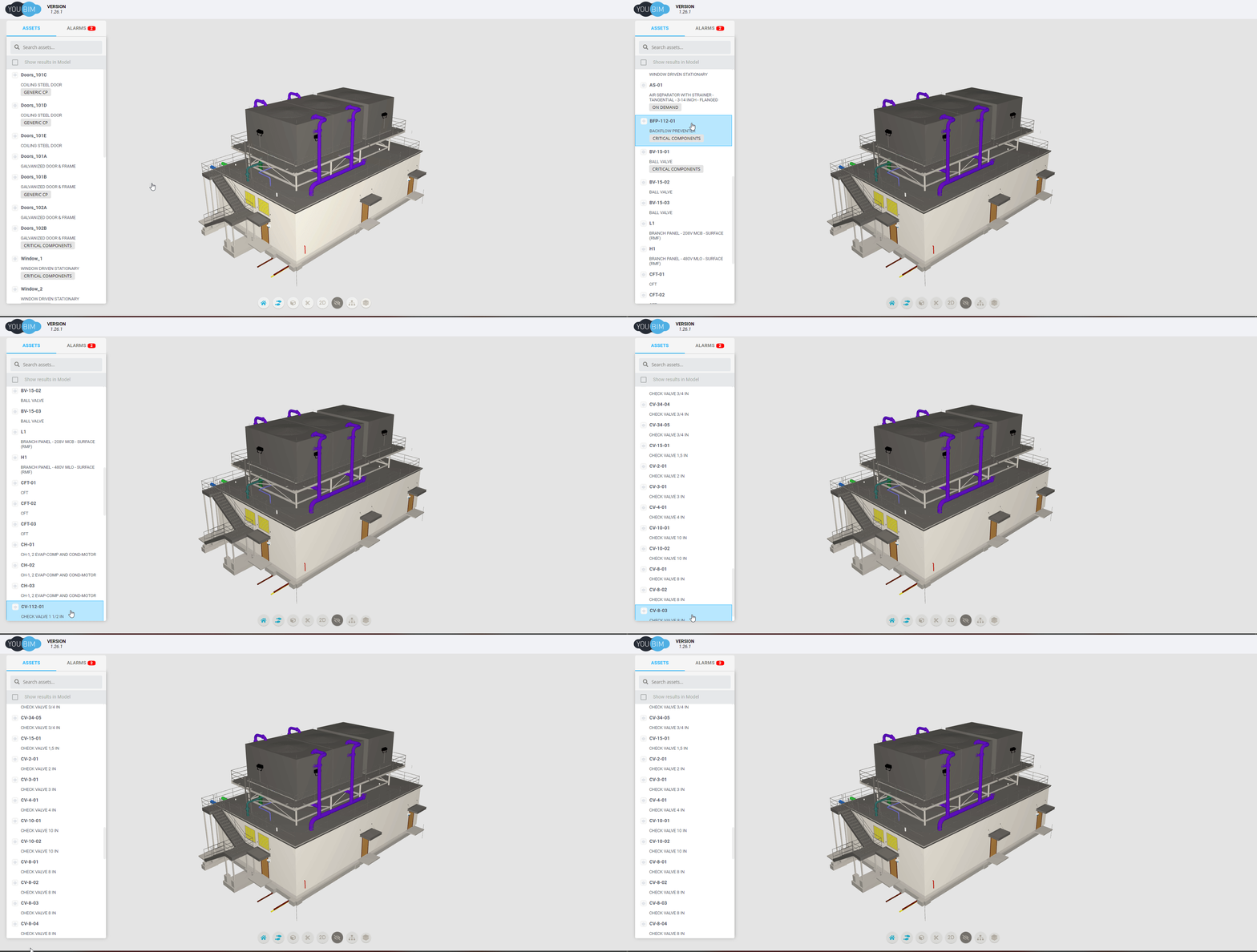
By overriding this method you can get asset’s list from any API you have access to. Receive the page number, to be able to load the list by infinite scroll, and search param to fins in the assests list.
In order for the framework to be able to show the information, you need to respect the below format:
    //Contract
    interface IDataAsset {
        id: number;
        name: string;
        description: string;
        classifications: Array<IDataAssetClassification>;
        GUID: string;
    }

    interface IDataAssetClassification {
        id: number;
        name: string;
    }

    async GetAssetList(pageNumber, search) {
        let assets = await GET(`https://extarnal.site/assets/${search}`);

        assets = assets.map((asset) => ({
            id: asset.name,
            name: asset.name,
            description: asset.description,
            classifications: asset.clasifications
            GUID: asset.GUID,
        }));
        return { assets, pageNumber };
    }
* GetAssetWithSensors(refresh?: boolean): [] IAssetsSensors ;
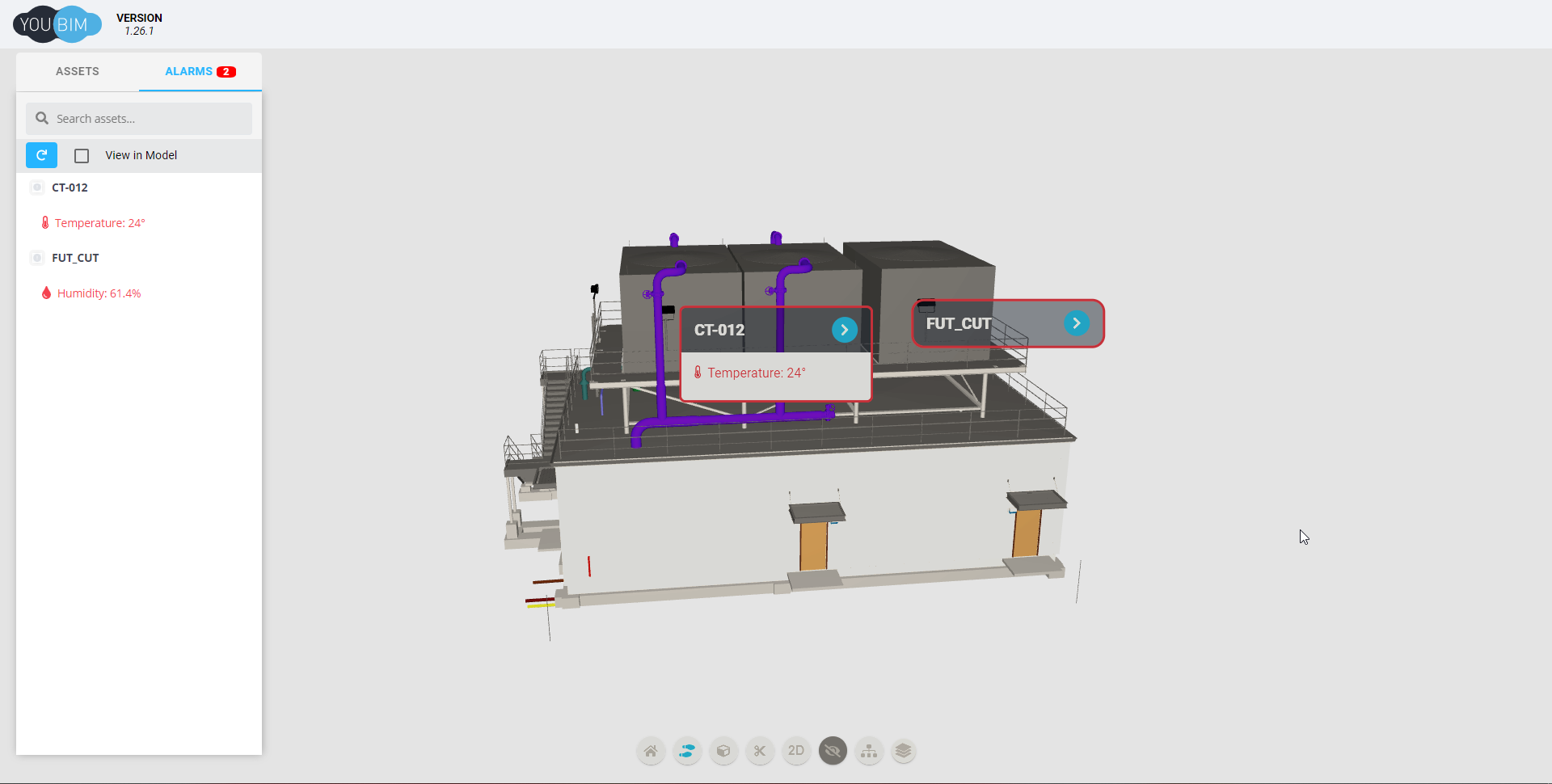
Override this method to get an assets list that contains some type of sensor with alarms.
    //Contract
    interface ISensor {
        id: number;
        icon: string;
        name: string;
        value: string;
    }
    interface IAssetsSensors {
        count: number;
        asset_name: string;
        id: string;
        sensors: Array<ISensor>;
    }

    async GetAssetWithSensors(refresh) {
    let response = await GET(`https://extarnal.site/assets`);
    var data = [];
    response.map((asset) => {
        data.push({
          count: 1,
          asset_name: asset.asset_name,
          id: asset.guid,
          sensors: sensors,
        });
      }
    });

    return data;
  }
* async GetSystemList(buildingId: number): any;
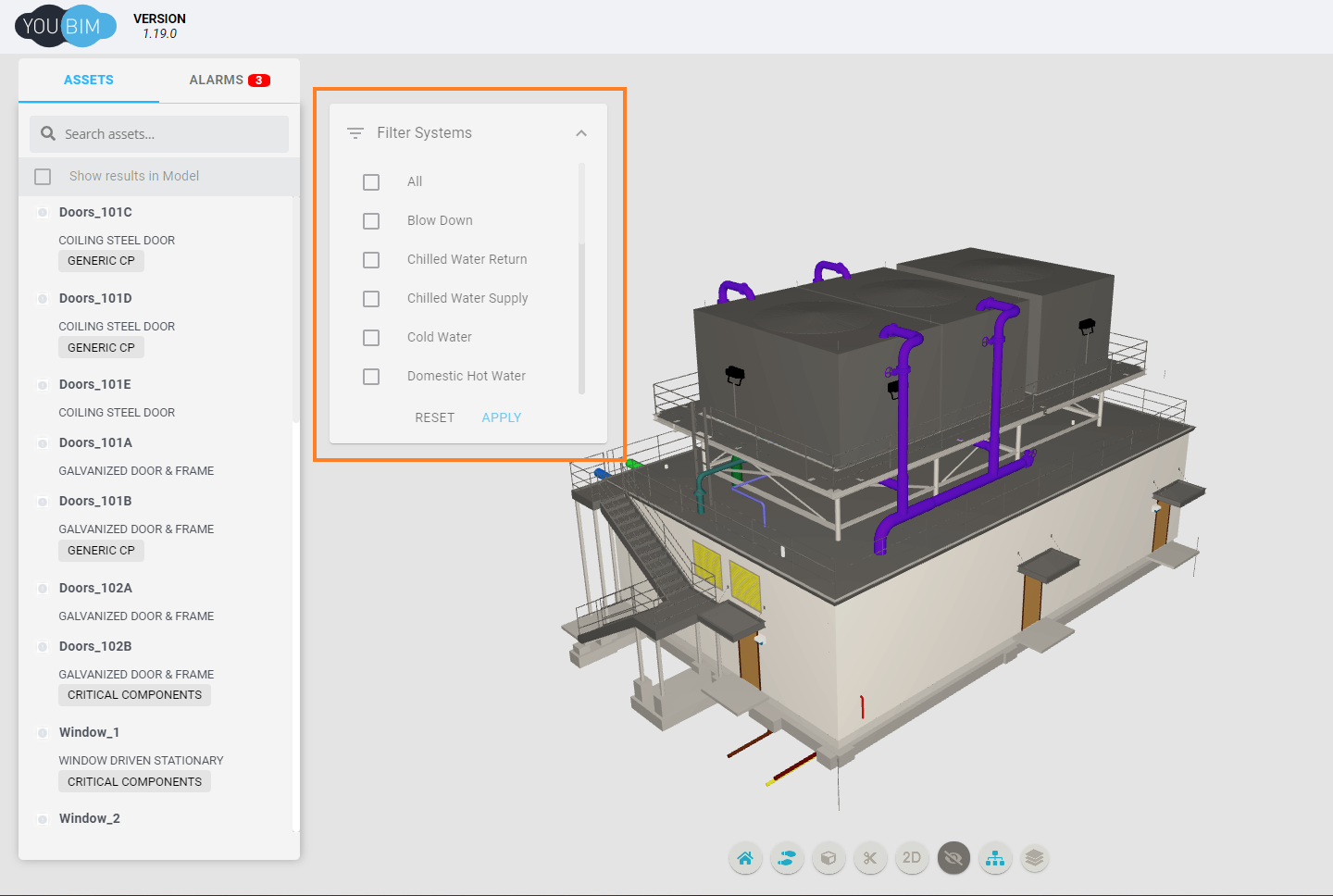
This method allows you to get the system’s list to filter the viewers by group of assets.
    async GetSystemList(buildingId) {
        let response = await GET(`https://extarnal.site/${buildingId}`);
        return response;
    };
The response should be contains the following format:
   const systems = [{
        id: 0;
        name: "system id";
    }]
* GetSystemAssetsById(buildingId?: number, systemIds?: number): [ ] number;
By overriding this method you can get the assets that conform each system, and thus, isolate them in the viewers.
    async GetSystemAssetsById(buildingId, systemIDs) {

        // If it's a single system from an asset
        let pathURl = `https://extarnal.site/${systemIDs}`;

        // If it's a collection of systems
        if (Array.isArray(systemIDs)) {
            let params = {
                FilterId: systemIDs.length ? systemIDs.toString() : null
            };

            params = Object.keys(params)
                .map(key => `${key}=${params[key]}`)
                .join('&');
            pathURl = `systems/externalByBuilding/${buildingId}?${params}`;
        };

        return await GET(pathURl);
    };
* async GetAssetsByFloorId(floorId: number);
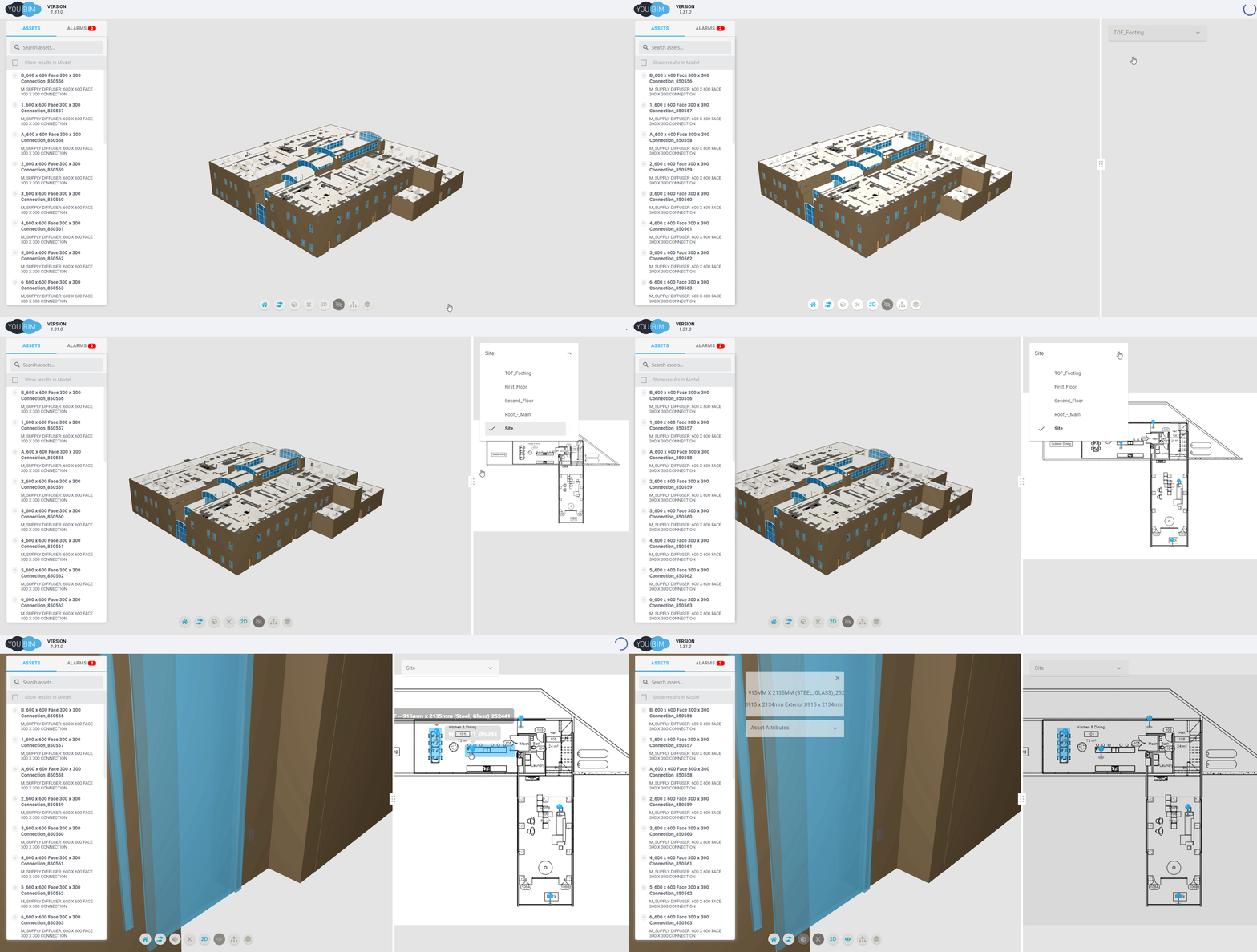
If the floor contains a PDF instead of an SVGs, it is necessary to call this method to get the assets that were mapped on the YOUBIM side.
  async GetAssetsByFloorId(floorId) {
    let assets = await GETA(`https://extarnal.site/assets/?id=${floorId}`);
    return assets;
  }
This API return the following contract:
{
	"idFloor": 123456,
	"sketch": "{\"objects\":[{\"type\":\"rect\",\"version\":\"4.3.1\",\"originX\":\"left\",\"originY\":\"top\",\"left\":74,\"top\":139,\"width\":79,\"height\":192,\"fill\":\"rgb(37 181 255 / 50%)\",\"stroke\":\"#25B5FF\",\"strokeWidth\":2,\"strokeDashArray\":null,\"strokeLineCap\":\"butt\",\"strokeDashOffset\":0,\"strokeLineJoin\":\"miter\",\"strokeUniform\":true,\"strokeMiterLimit\":4,\"scaleX\":1,\"scaleY\":1,\"angle\":0,\"flipX\":false,\"flipY\":false,\"opacity\":1,\"shadow\":null,\"visible\":true,\"backgroundColor\":\"\",\"fillRule\":\"nonzero\",\"paintFirst\":\"fill\",\"globalCompositeOperation\":\"source-over\",\"skewX\":0,\"skewY\":0,\"rx\":0,\"ry\":0,\"idAsset\":6329423,\"nameAsset\":\"CYS-GC-100-AS-E015-10320\",\"GUID\":\"78724c91-83ff-45cc-91a3-0daa510ea54a-007df4f6\",\"id\":\"b195f26b-7f66-4d10-a295-ae34326130eb\"},{\"type\":\"rect\",\"version\":\"4.3.1\",\"originX\":\"left\",\"originY\":\"top\",\"left\":277,\"top\":415,\"width\":89,\"height\":76,\"fill\":\"rgb(37 181 255 / 50%)\",\"stroke\":\"#25B5FF\",\"strokeWidth\":2,\"strokeDashArray\":null,\"strokeLineCap\":\"butt\",\"strokeDashOffset\":0,\"strokeLineJoin\":\"miter\",\"strokeUniform\":true,\"strokeMiterLimit\":4,\"scaleX\":1,\"scaleY\":1,\"angle\":0,\"flipX\":false,\"flipY\":false,\"opacity\":1,\"shadow\":null,\"visible\":true,\"backgroundColor\":\"\",\"fillRule\":\"nonzero\",\"paintFirst\":\"fill\",\"globalCompositeOperation\":\"source-over\",\"skewX\":0,\"skewY\":0,\"rx\":0,\"ry\":0,\"idAsset\":6329425,\"nameAsset\":\"CYS-GC-100-AS-E015-10322\",\"GUID\":\"78724c91-83ff-45cc-91a3-0daa510ea54a-007dfcb3\",\"id\":\"2c9c537f-b140-473f-b93c-87b898d47262\"},{\"type\":\"rect\",\"version\":\"4.3.1\",\"originX\":\"left\",\"originY\":\"top\",\"left\":842,\"top\":602,\"width\":42,\"height\":91,\"fill\":\"rgb(37 181 255 / 50%)\",\"stroke\":\"#25B5FF\",\"strokeWidth\":2,\"strokeDashArray\":null,\"strokeLineCap\":\"butt\",\"strokeDashOffset\":0,\"strokeLineJoin\":\"miter\",\"strokeUniform\":true,\"strokeMiterLimit\":4,\"scaleX\":1,\"scaleY\":1,\"angle\":0,\"flipX\":false,\"flipY\":false,\"opacity\":1,\"shadow\":null,\"visible\":true,\"backgroundColor\":\"\",\"fillRule\":\"nonzero\",\"paintFirst\":\"fill\",\"globalCompositeOperation\":\"source-over\",\"skewX\":0,\"skewY\":0,\"rx\":0,\"ry\":0,\"idAsset\":6313847,\"nameAsset\":\"CYS-P1-101-BR-E008-175\",\"GUID\":\"9b25e4f5-05c8-4159-ba7e-cc35f4194e0a-00635d72\",\"id\":\"8de7a970-02c0-404b-8a3f-c308f7df9372\"}]}"
}
Note: The skecth property contains the necesary data to located the assets on the PDF.
* async GetAssetsWithTags() [ ] any
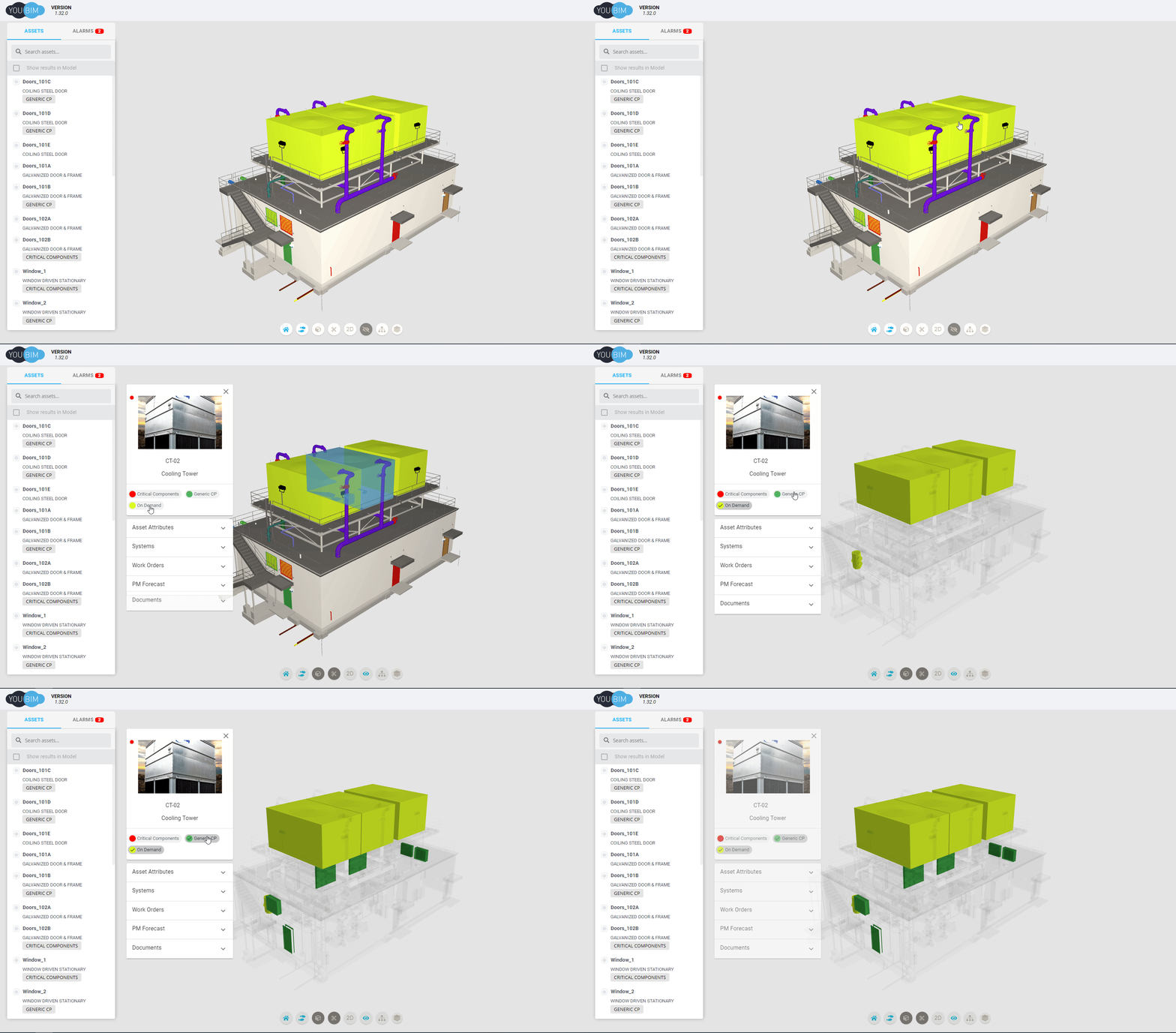
By overriding this method you can get the assets that classification by tags.
  async GetAssetsWithTags() {
    let GUIDSet = await GET(`https://extarnal.site/tags/listAssetsTags/${buildingId}`);
    return GUIDSet;
  }
This API return the following contract:
[
  {
    GUID: "dd2b5bb1-430b-4021-af3b-559ac6c75c2f-0038d76e",
    color: 4278190335
  },
  {
    GUID: "f441cae6-6aef-4d58-9a35-750bff73e251-003d2c47"
    color: 4278190335
  },
]
Note: The color property and GUID are very necesary data to located the assets on the viwer and set the correct color.
* async GetAssetsByTagId(selectedTags: number[]) [ ] string
By overriding this method you can get the assets classified by tag, so, the viewer can display the assets selected. The selectTags param is an array number that contains the tag id.
 async GetAssetsByTagId(selectedTags) {
    let assets = await GET(
      `https://extarnal.site/TagsFilterId=${selectedTags}`,
    );
    return assets;
  }
How to create a new Provider
By default the YIF package contains a YouBIM provider js/data/Provider.js which gets information from the YouBIM API. You can use this file as your baseline and modify accordingly.
Example
class CustomDataProvider extends YouBIMIntegrationFramework.DataProvider {
  *GetAssetDataByGUID(guid) {
    const asset = yield magicMethodToGetAssetInformation(guid);

    if (!asset) {
      return null;
    }

    yield {
      title: asset.name,
      description: asset.description,
      link: `https://extarnal.site/asset/${asset.id}`,
      image: asset.image,
      tags: asset.tags,
      blocks: [
        {
          title: "Asset Attributes",
          body: {
            ...asset.attributes.reduce((a, b) => {
              a[b.name] = b.value;
              return a;
            }, {}),
          },
        },
        {
          title: "Systems",
          body: asset.systems.map((system) => ({
            ...system,
            title: system.name,
            statusCheck: true,
          })),
        },
      ],
    };

    const wos = yield magicMethodToGetWorkOrders(guid);

    yield {
      statusCheck: !wos.length,
      blocks: [
        {
          title: "Work Orders",
          body: wos,
          onClick: (workorder, actions) => {
            window.open(
              `https://extarnal.site/workorder/${workorder.id}`,
              "_blank"
            );
          },
        },
      ],
    };

    const documents = yield magicMethodToGetDocuments(guid);

    yield {
      blocks: [
        {
          title: "Documents",
          onClick(document, actions) {
            window.open(
              `https://extarnal.site/document/${document.id}`,
              "_blank"
            );
          },
          body: documents.map((doc) => ({})),
        },
      ],
    };
  }
}